

Why Your Website Gets Traffic but No Enquiries: A Practical Digital Marketing Diagnosis
Suppose a coaching institute pays for clicks on its spoken English course page. The campaign report looks healthy, but the front desk keeps taking calls from people who want free study material or a course in another city. The real question is how many of those visitors are genuinely considering enrolment.
When a website attracts visitors but generates few enquiries, there may be more than one reason. The campaign may reach the wrong searchers, the page may not answer their questions, contact may be awkward, enquiries may go unrecorded, or they may be handled badly once they arrive. Several of these problems can occur at the same time. Before redesigning the website, it makes more sense to find out where potential enquiries are being lost.
Visits Are Not the Same as Demand
People visit websites for different reasons. Some are looking for information, others are comparing providers, and some are ready to make a decision. Someone searching for how to renew a trade licence may never need a provider; someone looking up CA firm fees in Salt Lake is closer to choosing one, and a person booking a dentist nearby is closer still. A page may attract plenty of informational searches without generating many enquiries. That is not necessarily a problem if the page is doing the job it was created for.
Geography sharpens the problem. A Kolkata dental clinic with an article on wisdom tooth pain may be read largely by people in other states, who cannot realistically become patients. Reaching people near the clinic is a separate task, and a guide to local SEO in Kolkata explains how local search visibility works. It improves the chance of reaching nearby searchers without guaranteeing enquiries.
What Search Console and GA4 Can and Cannot Tell You
Google Search Console shows how your website performs in Google Search, including the queries that generate impressions and clicks and how performance varies across pages, countries and devices. Filter it to your main service page and review the queries. If clicks come mainly from informational searches or locations outside your service area, investigate whether those visitors are likely to become customers. These patterns can help explain weak enquiry numbers, but they do not establish the cause on their own. Search Console also does not show every query, particularly some less common ones.
Google Analytics 4 (GA4) helps you understand what visitors do on your website, provided the relevant activity is being measured correctly. Compare channels, engagement and key events by landing page. The important thing is to distinguish what the reports show from what you think might be causing the problem. You may observe short visits to a service page from paid traffic. That could mean the page missed what people wanted, but visitors may also have found the phone number and called, or the interaction may never have been tracked. Healthy engagement with no key events could likewise mean friction or a tracking gap. These patterns do not identify the cause on their own, but they can help you decide what to investigate next.
Learning to interpret search and analytics reports takes practice. Business owners who manage their own websites, as well as people starting a career in digital marketing, can benefit from understanding what these numbers actually mean. Anyone considering an SEO course in Kolkata should check whether the course includes practical work with search performance data.
Check Whether the Page Answers the Visitor’s Question
Imagine someone searching for an interior designer in Salt Lake who lands on a homepage filled with general claims about creativity but little information about the actual service. Nothing says whether you work in that area or what a first conversation involves. They leave without enquiring, and the analytics report may offer no clear explanation for why.
Read your main landing pages as that stranger. Is the service and area named plainly? Is there some indication of price, or of what affects it? Is the next step obvious, and is there a reason to trust you? A redesign is not automatically the answer; testing small improvements, such as a clearer headline and a few honest paragraphs, is cheaper.
Look for Friction in the Enquiry Process
Mechanics can defeat a convinced visitor: a button labelled only “Submit”, a form demanding address and budget upfront, a phone number that cannot be tapped, slow pages, or pop-ups that are hard to close on a small screen.
Test on a real phone over mobile data, since a resized desktop browser does not reproduce touch behaviour or connection speed.
Open the page as a new visitor would. Try to call the business, open WhatsApp and submit the form. Check whether each step works without confusion.
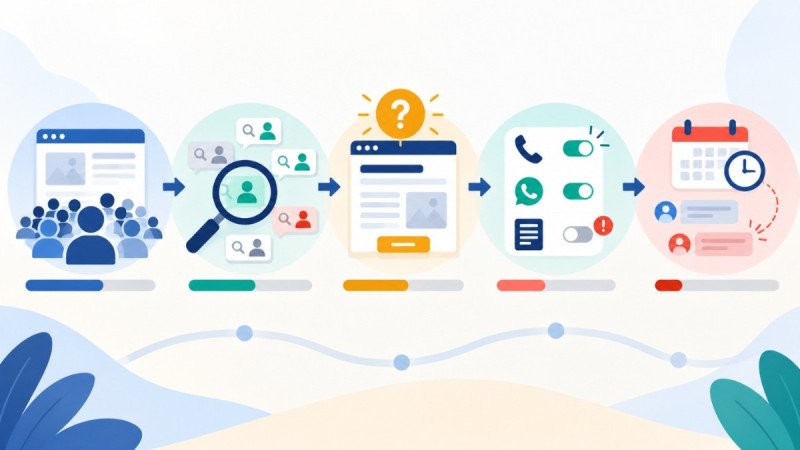
Confirm That Enquiries Are Actually Being Measured
Check what is being recorded. A tap on a phone number is not a connected call, a WhatsApp button click is not a message sent, and a form interaction is not necessarily a submitted enquiry that reaches the business.
In GA4, an event can be marked as a key event once it is being collected. This does not configure the tracking itself, so first confirm that the relevant interaction is recorded correctly and represents the action you want to measure. Some interactions can be collected automatically, but form, phone and WhatsApp tracking often needs its own configuration, commonly through Google Tag Manager. Google Tag Manager’s Preview mode and GA4’s DebugView can help you check whether the expected events are being recorded during testing.
GA4 data can be affected by consent settings and other measurement limitations. Depending on the implementation and eligibility requirements, Google Analytics may model some activity that is not directly observed. This is not available in every situation, so missing enquiries should not automatically be attributed to consent settings.
A useful starting point is to test each enquiry route manually. Submit a test form, place a test call and compare the results with GA4, your inbox and your call log. Remember that a phone tap, a completed call and an enquiry that becomes a customer are different outcomes.
Trust, Offer and Follow-Up
Genuine reviews, clear service details and realistic timelines help visitors judge credibility, as does an offer that is easy to compare with a competitor’s.
An enquiry sent on Friday evening and answered on Tuesday has probably gone elsewhere. Missed calls and no follow-up are sales-process failures that a redesign will not fix. If few enquiries arrive, examine the website and traffic; if they arrive but few become customers, examine response time and follow-up first.
A Hypothetical Example: One Clinic, Several Causes
Consider a hypothetical physiotherapy clinic in Kolkata. This is an illustrative scenario, not a client case. Its blog on back-pain exercises draws plenty of organic visits, yet few people call to book.
The owner first tests the enquiry process. The form reaches reception, but GA4 records no corresponding event. This indicates a tracking issue that should be investigated before the owner relies on analytics reports to assess enquiry performance.
Next is traffic. Suppose Search Console shows most clicks arriving on exercise queries, many from outside the city, while the sciatica treatment page is rarely visited. That would suggest readers rather than prospective patients. On a phone, the number is plain text rather than a tappable link, and the form is long. Calls after clinic hours go unanswered.
Where to Start
- Verify tracking. Test every enquiry route against your own records.
- Review traffic relevance. Check queries, locations, channels and, for ads, search terms.
- Compare key pages with visitor intent.
- Test the enquiry journey on a phone.
- Audit follow-up. Check response times, missed calls and ownership.
- Revisit trust, offer and design once cheaper explanations are ruled out.
The order can shift: if the inbox is busy but reports are empty, start with tracking.
When Outside Help Is Worth Considering
Professional help may be useful when several problems overlap, or a business cannot identify which marketing channels are generating genuine enquiries. Mivja is a digital marketing training institute and services provider based in West Bengal, and businesses looking for professional support can read about its digital marketing services.
Whichever provider you consider, whether a digital marketing agency in Barasat or one based elsewhere, ask how it will tell genuine enquiries from clicks and calls, judge whether traffic comes from people who could plausibly buy, and find out whether enquiries are answered promptly. A good provider should be able to explain how it will measure genuine enquiries, not just report increases in traffic or rankings.
Start by finding where the process breaks down, from the people arriving on the website to the way enquiries are handled. Fix the problems the evidence points to, then decide whether attracting more visitors is the next sensible step.